Output Browser
The output browser is an app for viewing a CP2K calculation. While the active tab shows the main output file, the sidebar on the right provides a wealth of additional information.
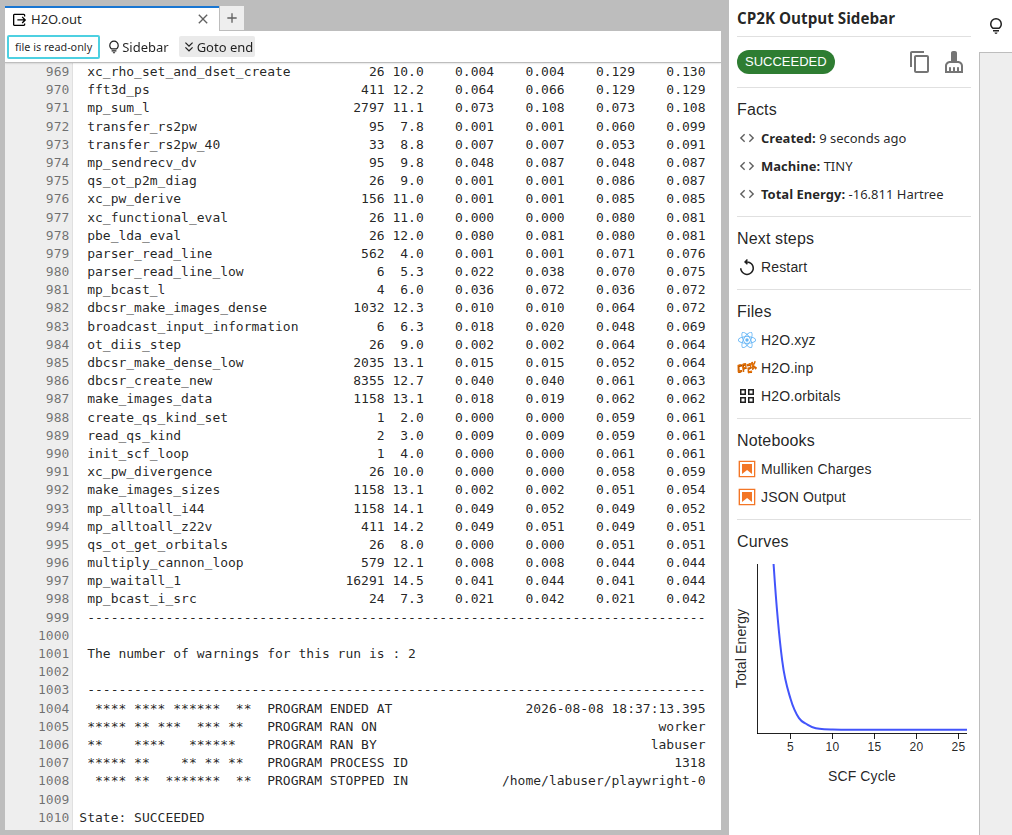
Facts
The facts show useful bits of information from the main output file. Clicking on one of the entries, e.g. the Total Energy, highlights the corresponding line in the output.
Next steps
Next steps offers convenient helpers for common tasks:
 Restart the calculation in a new directory.
 Export final geometry from the the coordinate trajectory to a new file.
Files
A CP2K calculation involves several files for input and output. While the full directory tree can be see on the left, the sidebar on the right shows only the most relevant files. These can be opened with dedicated file viewers.
Notebooks
More evolved analysis can be conducted with Python notebooks. For common tasks there are readily prepared notebooks available. They provide the perfect starting point for a deep dive into the results.
Curves
The energy curves provide a glance-able indicator of a calculation’s progress. The SCF cycles refer to the steps from the latest SCF optimization. The motion steps refer to the iterations of molecular dynamics or geometry optimization. The precise energies are available as tooltips when hovering the curves with the mouse.